Newsletter #65
Lately the free models on OpenRouter have been pretty unstable—sometimes they work, sometimes they don’t. Since I still had a few dollars of credit left there, I decided to burn through the rest today before switching over to iFlow full-time (until iFlow stops being free :v). Enjoy Newsletter #65. This post was created using Claude Code, Claude Code Router, OpenRouter & Anthropic: Claude Sonnet 4.5 (a ‘premium’ model hehe)
Scaling Engineering Teams: Lessons from Google, Facebook, and Netflix
Ido Green, drawing on more than a decade of engineering leadership at Google, Facebook, and Netflix, argues that when scaling from 10 to over 1,000 engineers, whether an organization thrives or collapses comes down to three pillars: structured goal-setting, an uncompromising focus on code quality, and intentional culture-building. At Google, OKRs are set ambitiously—3–5 objectives per team with 2–4 measurable key results each—where hitting 60–70% is the sweet spot and 100% means the goals weren’t ambitious enough. For code quality, Facebook requires every line of code to be reviewed, every part of the codebase to have an owner, and new code to maintain at least 80% test coverage; Netflix proactively injects failures with Chaos Monkey (randomly terminating production instances), runs failure drills, and rolls out canaries to 1% of users first.
On culture, Google sets aside one afternoon a month for experimentation; Facebook puts new hires through a 6-week Bootcamp where they fix bugs across the stack before choosing a team; and Netflix hires top talent, pays top-of-market compensation, and treats people like adults. Green recommends tracking the four DORA metrics such as deployment frequency and mean time to recovery. The biggest lesson: hero culture, manual processes, and tribal knowledge work at 10 people but become a disaster at 100; what scales are systems, documentation, automation, and clear ownership. Rather than cargo-culting practices, execute consistently and measure what matters.
The Trap of Excessive AI Use
David Pereira, author of Untrapping Product Teams, warns that overusing AI makes us mediocre rather than better. He isn’t anti-AI, but opposes the “automate everything” mindset—the assumption that if AI can do something, we no longer need to care about it. AI makes us faster, not wiser. He points to troubling habits: delegating prioritization to AI, having AI write PRDs instead of thinking through what actually matters, summarizing everything instead of learning deeply, and replacing real user research with AI-generated insights. Critical thinking, understanding human behavior, and challenging assumptions must remain ours; paradoxically, the more people rush to outsource everything to AI, the more valuable those who don’t become.
Pereira shares his own “old-school” habits—reading every message himself, writing his own emails to give himself time to think, reading whole books cover to cover, taking handwritten notes, and single-tasking—viewing them as a competitive edge. Still, AI is great for accelerating low-value work (drafting meeting notes, summarizing competitor features), exploring alternatives and stress-testing assumptions, tailoring messaging for different audiences, and brainstorming experiment ideas to learn faster. His rule of thumb is “AI can draft, but I decide”: delegate tasks, never ownership, because letting AI decide crosses the line from leveraging a tool to abdicating responsibility.
How Google, Amazon, and CrowdStrike Broke Millions of Systems
Milan Milanović dissects three massive outages showing how even simple bugs can turn catastrophic at hyperscale. In October 2025, a race condition in DynamoDB’s automated DNS management in us-east-1 caused a 15-hour AWS outage across 113 services: a delayed DNS Enactor overwrote Route 53 with a stale plan right as another Enactor cleaned up “expired” plans, wiping out the DNS records entirely—a classic time-of-check to time-of-use (TOCTOU) bug. DNS was restored after about 3 hours, but cascading failures dragged on for another 12. In June 2025, Google Cloud went down for roughly 7 hours: new code in Service Control, the gateway for every API call, lacked a null check and wasn’t gated behind a feature flag; it lay dormant for 14 days until a policy with a blank field was replicated globally via Spanner in seconds.
The third outage struck in July 2024: Channel File 291 triggered an out-of-bounds array read inside CrowdStrike’s kernel-mode interpreter, sending 8.5 million Windows machines into boot loops that had to be fixed manually in Safe Mode one machine at a time. Across all three incidents, speed was prioritized over safety, single points of failure had massive blast radii, and automated recovery mechanisms themselves became failure amplifiers. The takeaways: use atomic state transitions, add circuit breakers and jittered backoff to recovery loops, roll out changes in stages with canaries, validate data before global replication, and test configuration with the same rigor as code.
The Linux Boot Process: From Power Button to Kernel
This post walks clearly through how Linux boots on x86 hardware, from pressing the power button to the kernel’s entry point, focusing primarily on the traditional BIOS flow (UEFI or alternative bootloaders skip some of these steps). When power comes on, the CPU resets into 16-bit real mode—a legacy of the original 8086—and jumps to the reset vector at 0xFFFFFFF0, where firmware places a jump instruction into its own initialization code. Legacy BIOS scans disks for a 512-byte boot sector ending in 0x55 0xAA, whereas modern UEFI understands filesystems and loads larger boot binaries directly. A bootloader like GRUB loads the kernel image into memory, populates the setup header, and hands control to the kernel’s setup code. That code establishes a predictable environment: normalizing segment registers, setting up a stack, zeroing the BSS section, and querying firmware for the system memory map via the e820 BIOS interrupt. Next come two mode transitions: into 32-bit protected mode (disabling interrupts, enabling the A20 line, loading minimal GDT and IDT tables, and setting the PE bit in CR0), and then into 64-bit long mode (enabling PAE in CR4, building identity-mapped page tables, loading their address into CR3, and setting the LME bit in EFER).
Once in 64-bit mode, extract_kernel decompresses the kernel image (gzip, xz, zstd, etc.), parses the ELF header to place code and data sections, applies relocations if the kernel isn’t loaded at its default address, and jumps into start_kernel. The article also explains kASLR: the decompressor picks random physical and virtual base addresses within available memory ranges—carefully avoiding occupied regions like initrd—making it much harder for attackers to guess where kernel code lives, and falling back to the default address if no suitable slot is found. Complete with a glossary, it’s an approachable primer for newcomers.
Build System Tradeoffs
jyn, who works on the build system for the Rust compiler, kicks off a series on build systems with a survey of what complex builds actually have to juggle: running binaries that were just built as part of the build itself (like integration tests invoking cargo build inside cargo test), accurate dependency tracking, cross-compilation (requiring compilers, standard libraries, and linkers for both host and target platforms), choosing between dynamic and static linking, and reproducible builds—a prerequisite for safe caching. According to the author, the most common mistake is forcing build configuration into a restrictive custom DSL: purely “declarative” builds are an illusion, so it’s far better to express build logic in a real programming language and serialize the resulting build graph into a minimal format like Ninja.
For dependency tracking, there are four main approaches. Manual declarations—even with compiler assistance like gcc -M—are error-prone. Always rebuilding from scratch is guaranteed correct but slow. Hermetic builds like Bazel, Buck2, and Nix restrict steps to explicitly declared inputs, unlocking safe remote caching. Tracing builds like Tup and Ekam discover dependencies automatically by intercepting syscalls, requiring zero manual declarations, but mostly only work on Linux and struggle to scale because the graph isn’t known upfront. The author concludes that prioritizing correctness always comes with trade-offs, combining syscall tracing with hermetic sandboxing looks like the sweet spot, and writing build rules in a general-purpose language that compiles down to a serialized graph has surprisingly few downsides.
How I Use Every Claude Code Feature
Shrivu Shankar shares how he uses nearly every feature of Claude Code in practice. The most important foundation is the root CLAUDE.md file—the agent’s “constitution”: at his company, it is capped at 13KB and documents only tools used by at least 30% of engineers. He advises starting with guardrails based on mistakes Claude actually makes rather than writing an exhaustive manual, avoiding @-mention file embeds because they bloat context, and never writing a negative rule without providing the preferred alternative. Within the 200k-token context window, he avoids /compact because it’s opaque and lossy, preferring /clear paired with a custom /catchup command that re-reads changed files, or having Claude dump progress to a .md file before starting a fresh session. He avoids custom subagents because they hide context and force the agent into rigid human workflows; instead, the main agent uses Task(...) to spawn clones of itself—a pattern he calls “Master-Clone.”
Hooks are invaluable in enterprise repos: blocking commits when tests haven’t passed, paired with non-blocking suggestion hooks, while avoiding block-at-write hooks that confuse the agent mid-task. Echoing Simon Willison, he argues Skills may matter more than MCP because they formalize the “scripting” paradigm—the evolutionary step after single prompts and tool calling—leaving MCP as a narrow security gateway for stateful environments like Playwright. Finally, the most underrated feature is the Claude Code GitHub Action: full container control, tight sandboxing, and complete audit logs that can be mined periodically to improve CLAUDE.md and developer tooling.
If you don’t tinker, you don’t have taste
seatedro writes about “tinkering”—poking at small things and tweaking them just to see how they can be improved—as a lifelong learning tool. The author tried everything from guitar and art to martial arts, yet didn’t start tinkering with programming until relatively late; once it clicked, it became central to how they learn, and they wish they had started sooner. Tinkering means spending hours dialing in mouse sensitivity in a game, losing days configuring a Linux window manager just for fun, or taking apart a mechanical keyboard to swap keycaps and test switches. Some people only do things that serve a concrete goal, while others do things “just because”; the ideal is combining both. The author quotes @ludwigABAP that tinkering and throwing the result away is practice, and practice should be ephemeral, exploratory, and frequent.
In the author’s view, using Git from the command line instead of GitHub Desktop or knowing basic Vim motions should be baseline literacy rather than a rarity, though balance still matters: the last time they tweaked their Neovim config was six months ago. In a single week, the author wrote their first GLSL fragment shader, Rust procedural macro, C++ template, and Swift app, and tried out the Helix editor—none of it strictly necessary. The core message is that “taste”—the ability to tell mediocrity from excellence—only develops when you try lots of things, keep what resonates, and discard what doesn’t; so question defaults, experiment, and break things every day.
Bonus: Some cool visuals from ByteByteGo
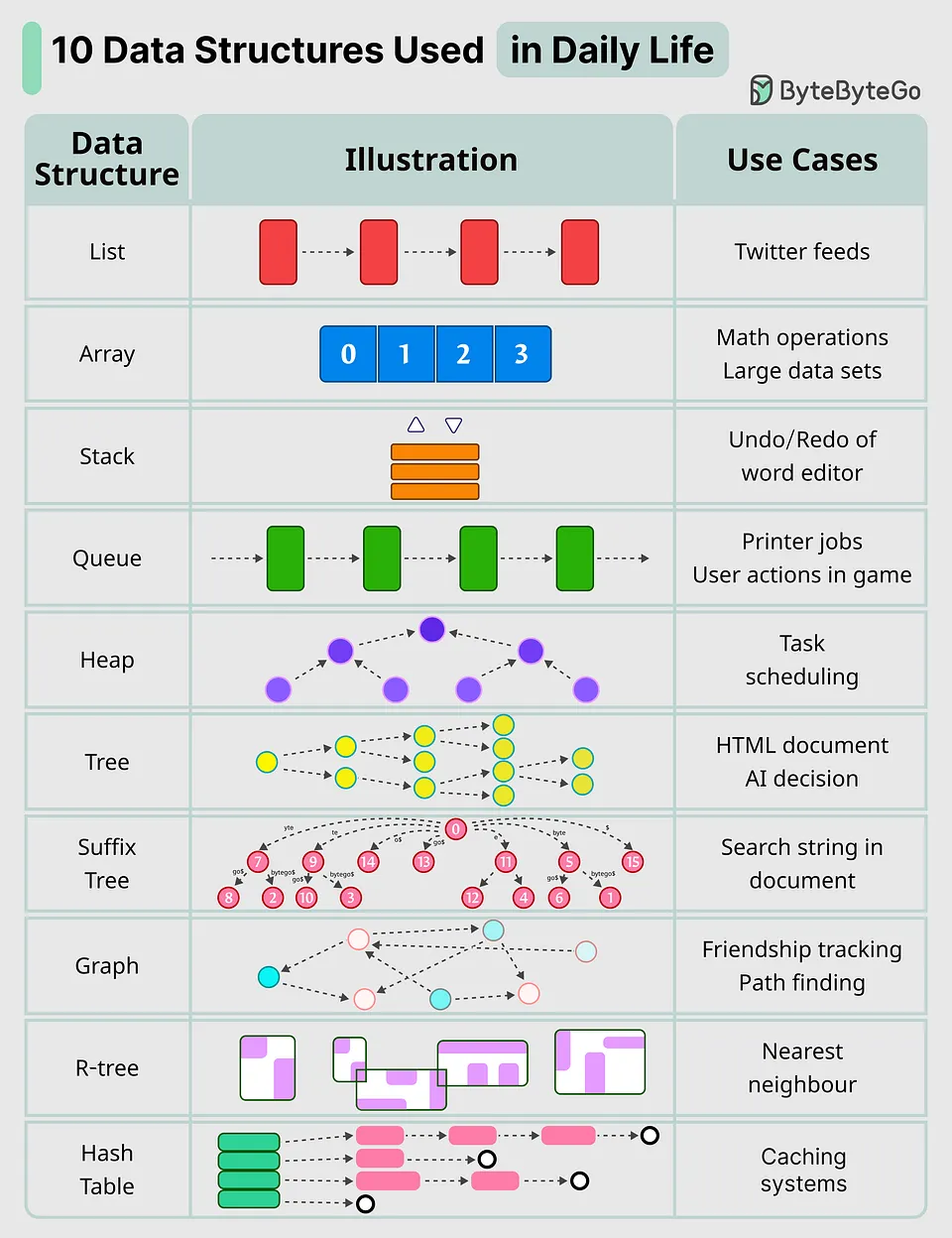
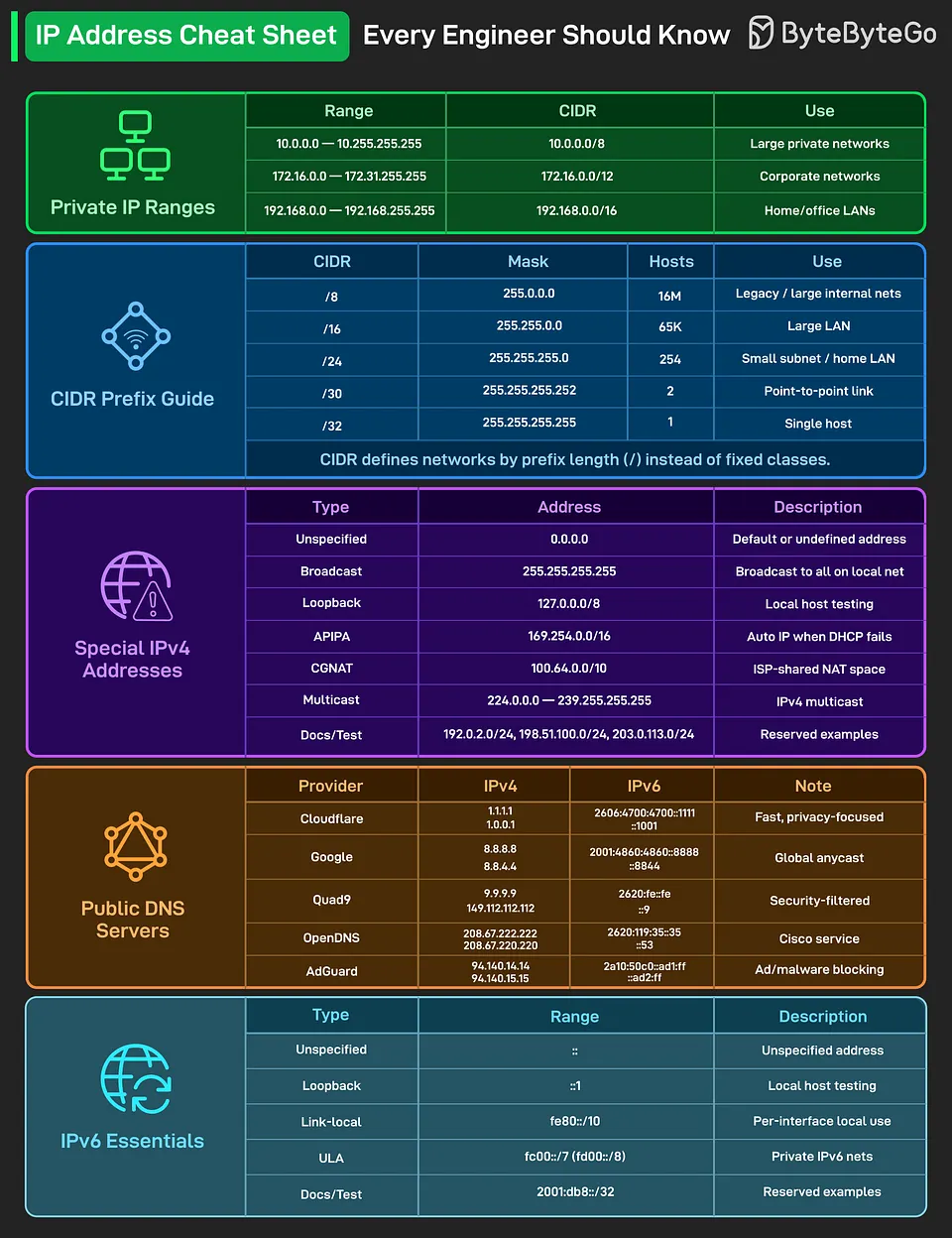
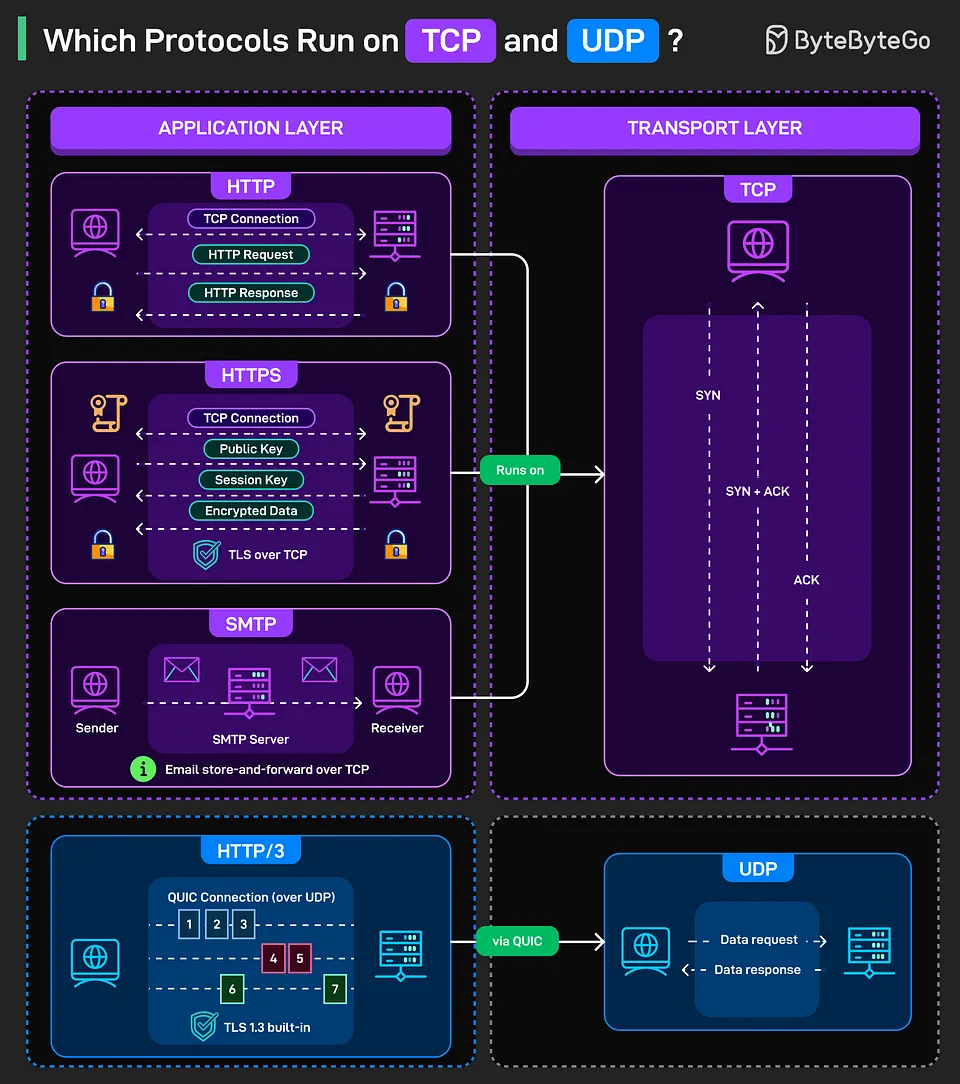
Verdict: Whoa, it hit the credit limit right while processing the last URL. I started with $2 (around 52k VND) and it only processed 7 URLs, which comes out to ~7.5k VND per article. Pretty steep :v And the output still wasn’t quite what I wanted, since it still overused English terms—you can clearly see that in the last summary. It might be an issue with my AGENTS.md file, so I’ll optimize that later. Either way, I achieved my goal of burning through the remaining credit so I can go back to using free tiers :v See you in upcoming posts :D.
This post was rewritten by Claude Code with Opus 5.5 on 27/09/2026; reviewed and edited by Codex with GPT 6.1 Sol on 09/11/2026, and re-verified by Claude Code with Sonnet 5.5 on 16/11/2026.
Comments