Newsletter #62
Enjoy Newsletter #62. This post was created using VSCode Chat + OpenRouter + xAI: Grok 4.1 Fast (free)
Claude Skills are awesome, maybe a bigger deal than MCP
In this October 2025 post, Simon Willison introduces Anthropic’s Claude Skills, a simple mechanism for giving models new capabilities: each skill is a directory containing a Markdown file that instructs the model how to perform a task, accompanied by supporting docs and pre-written scripts when needed. What makes it a real feature is that at the start of a session, Claude only reads the short description in each skill’s YAML frontmatter (a few dozen tokens per skill) and loads the full content only when the user’s request actually needs it. Willison tests the slack-gif-creator skill to generate a GIF comparing Skills with MCP: Claude writes a Python script using PIL to build the animation, then calls a validation helper bundled with the skill to ensure the file stays under Slack’s 2MB limit. The first GIF was rough, but the skill made iterating easy.
Skills depend entirely on a code execution environment with a filesystem and shell access, such as Claude Code, Codex CLI, or Gemini CLI—the biggest difference between Skills and MCP or ChatGPT Plugins. In Willison’s view, Claude Code is actually a general-purpose agent: a folder of Markdown files describing how to fetch census data, load it into SQLite or DuckDB, export Parquet, and visualize it with D3 is enough to turn it into a data-journalism agent. Compared to MCP, which burns tens of thousands of tokens just describing tools and carries a complex protocol specification, Skills are just Markdown plus a bit of metadata, easy to share and portable across models. That simplicity is their superpower.
Environment variables are a legacy mess: Let’s dive deep into them
Environment variables are a legacy Unix interface that remains the default way to pass runtime configuration to applications: a flat, global string dictionary with no namespaces or data types. They are passed from parent process to child process via the execve syscall with three parameters—filename, argv, and envp; by default, almost every tool forwards the entire environment, apart from exceptions like login that initialize a fresh one. At startup, the kernel places the variables on the stack as null-terminated strings, and each program copies them into its own internal data structure: Bash uses a stack of hashmaps (allowing local variables to be exported), glibc uses a dynamic array that makes getenv and putenv linear-time operations, and Python’s os.environ syncs only one way down to the C library’s putenv.
The kernel itself is remarkably permissive about format: it accepts duplicate names, strings without an =, and even emoji. On Linux with 4 KiB pages, each string is typically capped at 128 KiB, while the total size depends on stack limits rather than a fixed 2 MiB across all machines. Bash strips duplicate and malformed entries, while names containing whitespace (which Nushell and Python handle fine) are kept in Bash’s invalid_env table and still forwarded to child processes. Contrary to popular belief, POSIX only requires that names not contain = and actually recommends lowercase names to avoid colliding with standard utilities, even though convention strongly favors uppercase. The author advises sticking to ^[A-Z_][A-Z0-9_]*$ names and UTF-8 values.
Examples are the best documentation
The author argues that examples are the single most useful form of documentation: 95% of the time you look something up, a simple example is all you need, yet official docs rarely include one. Technical documentation is often written for people already immersed in the ecosystem, whereas working developers constantly jump between projects, languages, and frameworks, paying a context-restoration tax every time. For instance, the signature max(iterable, /, *, key=None) in Python’s docs requires understanding *, /, positional-only parameters, iterables, and keyword-only parameters, whereas a few lines of examples immediately answer the most common questions:
max(4, 6) # → 6
max([1, 2, 3]) # → 3
max(['x', 'y', 'abc'], key=len) # → 'abc'
max([]) # ValueError
max([], default=5) # → 5
Clojure’s community-driven clojuredocs.org is a model here: users contribute examples for built-in functions, often combining related functions (like into, spit, and map) to make examples realistic. Because few projects maintain all four types of documentation, the author often hesitates to click a “Documentation” link for fear of landing on a dry, auto-generated API reference; instead, he searches for tutorials—not for step-by-step hand-holding, but just to find concrete code examples.
Hazardous States and Accidents
This post introduces a foundational concept from safety-critical systems engineering: distinguishing accidents (actual harm) from hazardous states. An accident occurs only when a system is in a hazardous state and encounters adverse environmental conditions (H ∧ E ⇔ A); because we can control our system but not the environment, safety is achieved by keeping the system out of hazardous states. In the author’s example, an aircraft landing with less than 30 minutes of fuel reserve is in a hazardous state even if nothing bad happens on that flight, because bad weather is all it would take to turn it into an accident; similarly, a child cannot promise “not to fall,” but can promise not to stand right on the edge of a cliff without someone spotting them below.
Enforcing safety constraints is a dynamic control problem: multiple controllers observe feedback about the current state, use a mental model to predict future states, and issue corrective actions; a system enters a hazardous state when any of those three elements falls short, including when corrective action is too weak or too aggressive. Controllers exist at every layer, from the engine’s FADEC and the pilots to air traffic control and regulators. Predicting hazardous states is far easier than predicting accidents, which is why organizations must analyze near misses instead of waiting for actual accidents—something aviation excels at but software engineering often neglects.
Multi-Core By Default
Ryan Fleury argues that multi-core programming should be the default rather than a special optimization bolted onto single-threaded code, because modern CPUs have 8, 16, 32, or 64 cores and ignoring them leaves massive performance on the table. Familiar approaches like “parallel for” or job systems carry real costs: spawning threads through the kernel or dispatching tasks to a thread pool, manually slicing up work, scattering control flow across cores and time in ways that complicate debugging, and tangling resource lifetimes. Inspired by GPU shaders, Fleury flips the model: spin up a fixed set of threads (“lanes”) upfront that all enter the same EntryPoint function together, using LaneIdx(), LaneCount(), and LaneSync() to partition work evenly and synchronize across barriers.
To sum an array, each lane uses LaneRange to claim a slice of elements, computes a local sum, and folds it into a shared total with an atomic add. Operations that must run serially—such as reading a file or printing output—are narrowed to a single lane with if (LaneIdx() == 0), which then broadcasts results (such as a buffer pointer) to all other lanes via LaneSyncU64. Uneven workloads can pull tasks from a shared atomic counter or switch to more uniform algorithms, such as radix sort instead of comparison-based sorting. This style requires less machinery, is easier to debug because every lane shares the same full call stack, and still runs cleanly on a single core simply by setting the lane count to 1. The author uses this architecture in building his debugger.
Vibing a Non-Trivial Ghostty Feature
Mitchell Hashimoto walks through his end-to-end process of using agentic coding (with Amp) to build an unobtrusive macOS update notification pill for Ghostty. He planned the architecture himself before touching AI: customize the Sparkle update framework’s UI and place a small pill button in the titlebar. In the first session, he asked the agent to plan and prototype the SwiftUI view; the result was on the right track but hit a tab-bar layout conflict that neither the agent nor Hashimoto could cleanly fix, prompting him to pivot to an overlay in the bottom-right corner of the window—which was also needed for hidden-titlebar configurations anyway. On the backend, he stubbed out function skeletons with TODO comments for the agent to fill in, but had to throw that attempt away because the design was flawed; only after he manually refactored the view model into a tagged union did subsequent agent sessions produce solid results.
His workflow consists of planning with the “oracle,” breaking work into small pieces, dedicating separate sessions to cleanup, documentation, and refactoring, building a mock driver to test update flows, wiring backend to frontend, and finally asking the agent what else could be improved. He emphasizes that hand-written scaffolding and thorough human review before merging are non-negotiable—never ship code you don’t understand. Across 16 sessions, $15.98 in token costs, and roughly 8 hours of wall-clock work, he found the process faster than doing it all by hand—especially when tweaking SwiftUI visuals—while letting the AI make progress while he stepped away for other tasks.
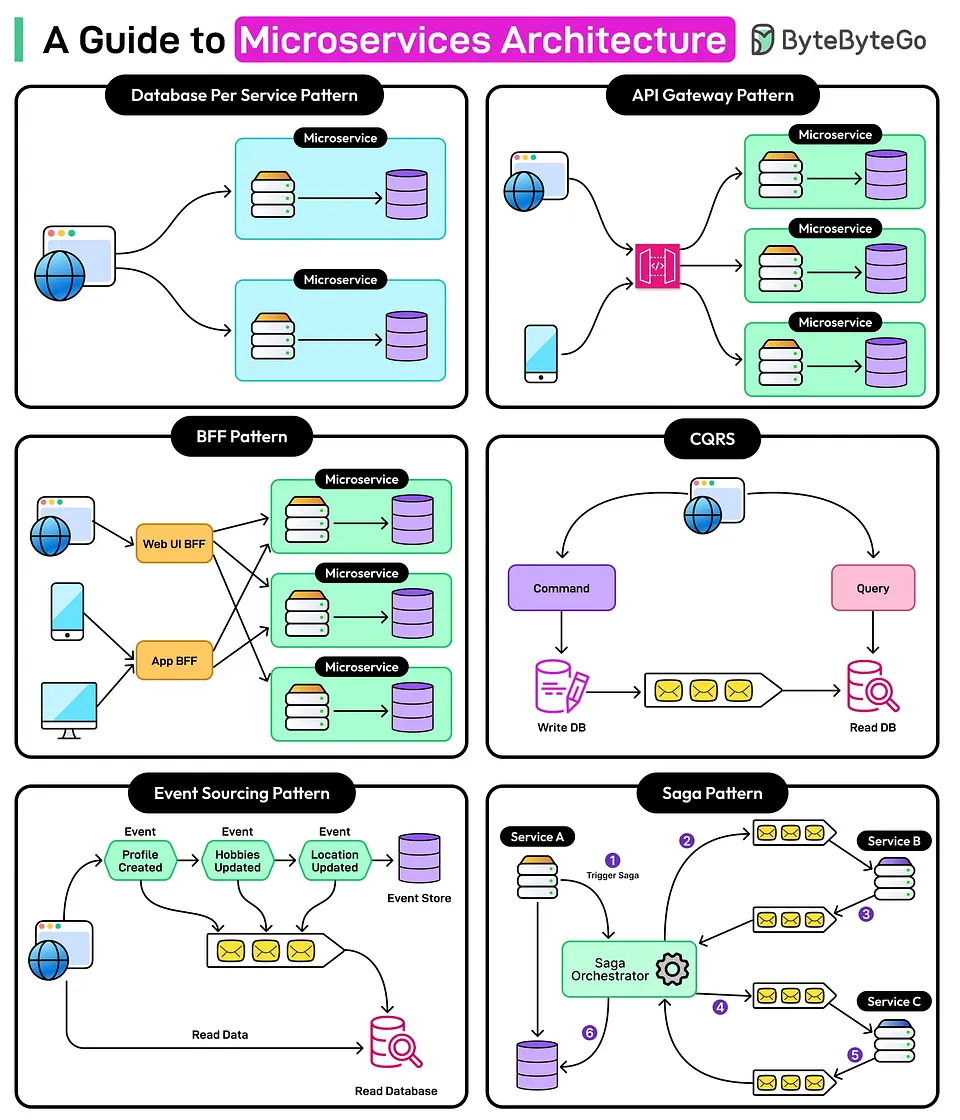
Bonus: An interesting visual from ByteByteGo
I’d rate the output from this combo around 4–6/10: the structure is decent and it captures the core points, though it still leaves a lot of English terms untranslated. The upside is that it’s built right into VSCode, taking advantage of VSCode’s built-in features without needing to run an extra terminal.
This post was rewritten by Claude Code with Opus 5.5 on 27/09/2026; reviewed and edited by Codex with GPT 6.1 Sol on 09/11/2026, and re-verified by Claude Code with Sonnet 5.5 on 16/11/2026.
Comments