How to Fix HTTP Timeouts When Using Coolify
After posting ByteByteGo diagrams for a few days straight, let’s switch things up today.
Sometimes when you deploy GitLab or Gitea on Coolify and try to push to it, you may run into an error like this:
git -c diff.mnemonicprefix=false -c core.quotepath=false --no-optional-locks push -v <your-remote> <local-branch>:<remote-branch>
POST git-receive-pack (chunked)
error: RPC failed; HTTP 504 curl 22 The requested URL returned error: 504
send-pack: unexpected disconnect while reading sideband packet
fatal: the remote end hung up unexpectedly
Pushing to <your-git-url>
Everything up-to-date
Completed with errors, see above.
If you search around online, you’ll probably come across the common suggestion to increase Git’s chunk buffer like this:
| |
Why Doesn’t git config http.postBuffer Work?
What is Git http.postBuffer?
- It’s the buffer size Git uses when sending data over HTTP POST
- By default, Git sends data in small chunks (typically 1MB)
- Increasing
postBuffermeans sending larger chunks, reducing the number of requests
Why doesn’t it help in this case?
The issue isn’t how Git sends the data — it’s the HTTP timeout on Coolify’s proxy:
- Git still sends the data successfully to the Traefik proxy
- The Traefik proxy waits for a response from the Git server (GitLab/Gitea)
- The Git server needs time to process the data (compressing, indexing, validating, etc.)
- Traefik times out before the Git server finishes responding → HTTP 504
Whether Git sends large chunks or small ones, the processing time on the Git server stays the same. That’s why increasing postBuffer doesn’t solve a timeout happening at the proxy layer.
Architecture and Root Cause
How a git push flows through the stack:
Git Client → Traefik Proxy → Git Server (GitLab/Gitea)
     ↑                ↑              ↑
  postBuffer    readTimeout     Processing time
Step-by-step breakdown:
- Git client sends data via HTTP POST (can take several seconds for a large repo)
- Traefik proxy receives and forwards the request to the Git server
- Git server starts processing:
- Unpacking objects
- Checking integrity
- Updating refs
- Running Git hooks (if any)
- Traefik waits for a response up to
readTimeout(default ~30s) - If the Git server takes longer → Traefik returns HTTP 504
Why does this happen on Coolify?
- Coolify uses Traefik as its reverse proxy
- Traefik’s default
readTimeoutis fairly low - Git operations with large files or repositories often take more than 30s to process
- This issue affects not just Git, but any HTTP service that needs long processing times
Solution
Go to Server > (your server, usually localhost) > Proxy > Configuration.
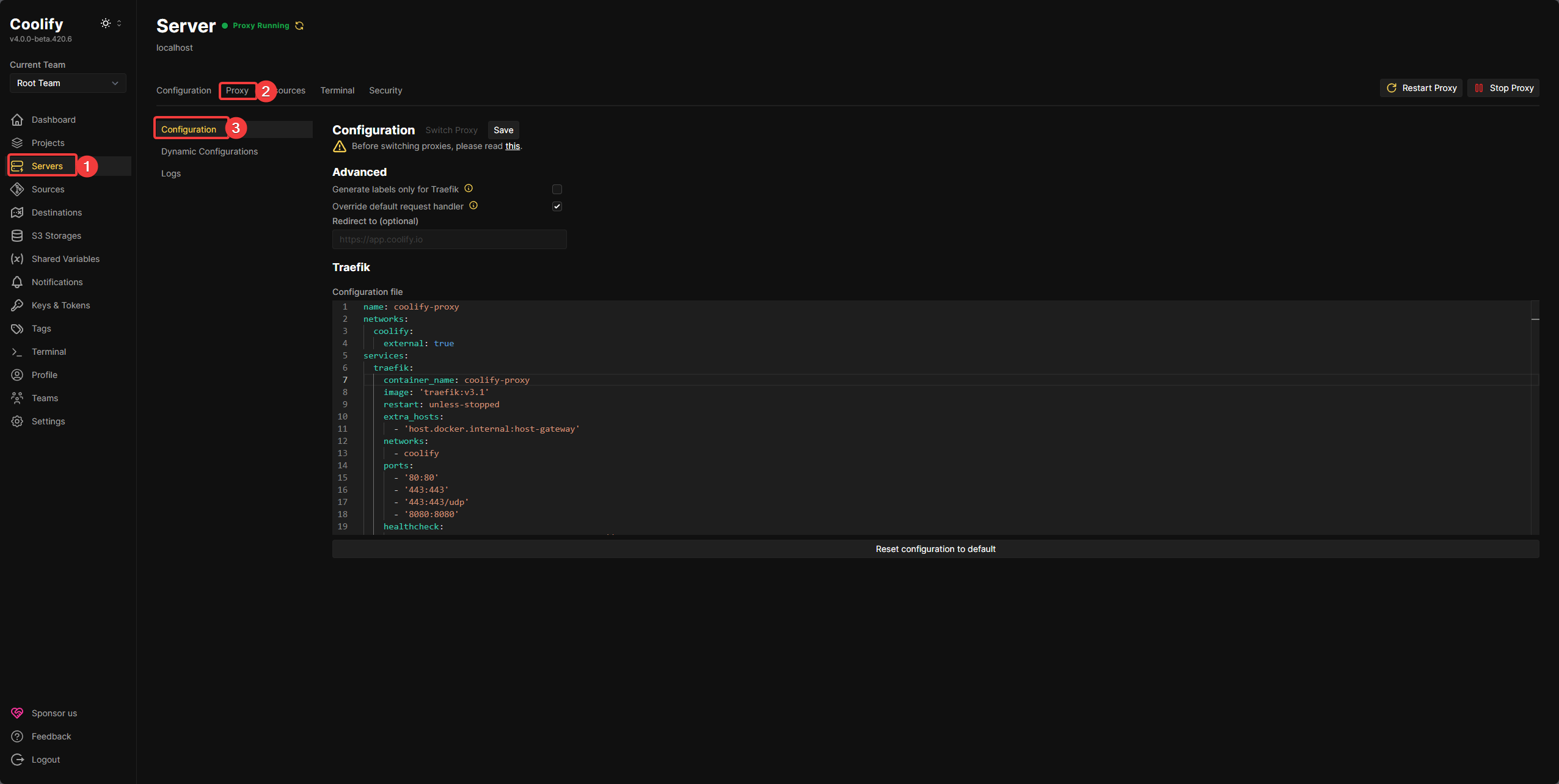
Add the following lines under services.traefik.command:
| |
Explanation:
readTimeout: Maximum time Traefik waits to read a response from the backend600s(10 minutes): A reasonable timeout for largegit pushoperations- You can adjust this depending on your repository size and network speed
Full config (for reference only — this may change in future Coolify releases, so only use it to see where the lines go):
| |
Applying the Changes
- Save: Save the Traefik configuration
- Restart Proxy: Restart the proxy to apply the new timeout
- Verify: Wait for the proxy to come back online (usually takes 30–60 seconds)
Important Notes
- Don’t set the timeout too high: It can leave connections hanging for a long time when a real failure occurs
- Test with a small repository first: Make sure the configuration works as expected
- Monitor logs: Check the Coolify and Traefik logs for debugging if needed
Good luck, and hope you get your code pushed soon!
Comments