Using GitHub Actions Cache to Reduce Build Time
Recently, when publishing my Newsletter posts, I’ve been attaching a lot of images. When building the site with Hugo, Hugo has to process all of these images (generating multiple resized versions to optimize load times). As a result, my build time increased noticeably—sometimes taking up to 4 minutes. To solve this problem, I looked into and applied GitHub Actions Cache to cut down the build time.
What Is GitHub Actions Cache?
GitHub Actions Cache is a feature in GitHub Actions that lets you persist files or directories between workflow runs. This avoids re-downloading dependencies or regenerating unchanged files from scratch, significantly reducing workflow execution time.
Common use cases for caching include:
- Project dependencies (
node_modules,vendor, etc.) - Build outputs (
resources,artifacts, etc.) - Databases or large data files
Why Optimize Build Time?
In practice, when building a Hugo site, rebuilding the entire site from scratch on every small change can take a lot of time, as I mentioned at the beginning of this post. In most cases, only a small portion of the website changes, while assets like images and stylesheets have already been processed in previous builds.
In Hugo, the resources directory stores processed files such as resized images and CSS compiled from SCSS. Caching this directory avoids reprocessing files that haven’t changed.
Implementing GitHub Actions Cache with Hugo
Below is the GitHub Actions workflow I use to deploy my Hugo site to GitHub Pages, with caching enabled for the resources directory:
| |
Cache Configuration Details
In the workflow above, there are two steps related to caching:
- Restore resources: Restores the cache from previous workflow runs
| |
- Save resources: Saves the updated cache after the build completes
| |
How the Cache Key Works
Parameters used in the cache configuration:
- path: Path to the directory or file to cache—here, Hugo’s
resourcesdirectory - key: A unique key identifying the cache. A common format is
${{ runner.os }}-[cache-name]-[hash] - restore-keys: A list of key prefixes used to find a fallback cache if an exact key match isn’t found
In this example:
${{ runner.os }}ensures the cache is only shared across runs on the same operating systemresourcesis the name of the cache${{ github.run_id }}is the unique ID of each workflow run
With this setup, when an exact match for ${{ runner.os }}-resources-${{ github.run_id }} isn’t found, GitHub Actions falls back to the most recent cache matching the prefix ${{ runner.os }}-resources-.
Performance Comparison
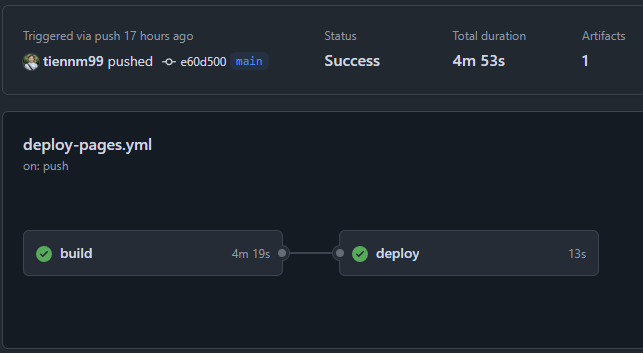
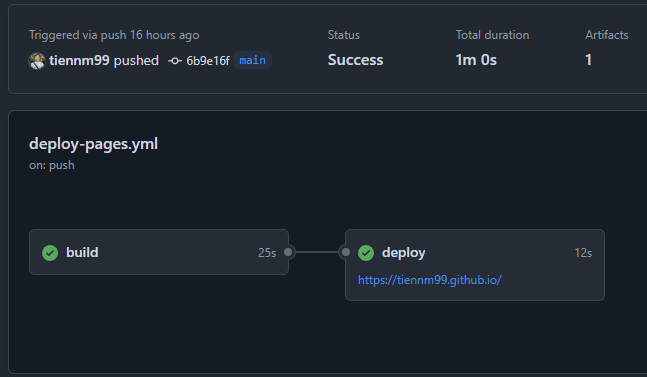
After enabling the cache, my build time dropped dramatically:
| Status | Average Build Time |
|---|---|
| Without cache | ~4 minutes 19 seconds |
| With cache | ~25 seconds |
For larger projects, the time saved can easily reach several minutes or even tens of minutes.
Going Further: Caching Other Dependencies
Besides caching Hugo’s resources, you can apply the same approach to other types of dependencies:
Node.js dependencies (node_modules)
| |
Go modules
| |
Cache Optimization Tips
To get the most out of caching, consider the following strategies:
- Selective caching: Only cache files that are genuinely needed, avoiding temporary files or logs
- Hash dependency lockfiles: Use hashes of lockfiles like
package-lock.jsonin your cache key so the cache updates automatically whenever dependencies change - Cache layering: Use separate caches for different components of your application
Conclusion
GitHub Actions Cache is a powerful tool for optimizing your CI/CD pipeline. With Hugo, caching the resources directory drastically cuts down build times, especially when your site has lots of images or stylesheets to process.
This is just a basic example of how to use GitHub Actions Cache. Depending on your specific project, you may want to adopt more advanced caching strategies.
If you’d like to learn more, check out the GitHub Actions Cache repository at https://
I hope this post helps you optimize your project’s CI/CD pipeline. If you have any questions or feedback, feel free to leave a comment below.
You can find the full workflow I’m currently using in my GitHub repo, or copy it directly from the example in this post.
Comments